You'll protect your eyes and boost productivity by implementing proven strategies to combat screen fatigue. Start by optimizing your display settings with proper brightness and contrast, while positioning your monitor at eye level about 20-28 inches away. Install proper workspace lighting, use blue light glasses, and follow the 20-20-20 rule: every 20 minutes, look 20 feet away for 20 seconds. Take regular movement breaks, maintain good posture, and use document stands to reduce neck strain. Keep your eyes lubricated and practice eye exercises throughout the day. These foundational habits will transform your digital workspace experience.
Highlights
- Follow the 20-20-20 rule by taking regular breaks every 20 minutes to look at something 20 feet away for 20 seconds.
- Position your monitor at arm's length, with the top aligned at eye level, and adjust brightness to match room lighting.
- Use blue light filtering glasses and activate device night modes to reduce eye strain during extended screen time.
- Take hourly movement breaks with stretching exercises and ensure proper posture with ergonomic furniture and adjustable stands.
- Keep eyes lubricated with artificial tears and maintain consistent blinking while working at screens to prevent dryness.
Optimize Your Display Settings

Ever wonder why your eyes feel strained after a long day of screen time? Your display settings play an essential role in preventing digital eye fatigue, and making a few smart adjustments can greatly improve your comfort.
Start by matching your screen's brightness to your room's lighting – you'll want it bright enough to read clearly but not so bright that it creates glare. In a typical office setting, aim for 100-150 cd/m² brightness levels. Next, adjust your contrast settings until text appears crisp without being harsh on your eyes. Increase text size to minimize eye strain while reading for extended periods. Don't forget to tilt your screen slightly upward and position it at arm's length to reduce neck strain. For additional comfort, consider activating your device's blue light filter, especially during evening hours when artificial light can interfere with your natural sleep patterns.
Perfect Your Workspace Lighting

While enhancing your display settings helps reduce eye strain, proper lighting in your workspace plays an equally important role. You'll want to aim for multiple light sources, combining overhead lighting with adjustable task lamps to create an ideal environment that prevents Computer Vision Syndrome. Studies show that 90% of office workers experience symptoms of digital eye strain at some point. Anti-glare protection can significantly reduce reflections and glare from your screen throughout the workday.
- Position your monitor parallel to overhead lights and away from windows to minimize glare
- Install adjustable blinds to control natural light throughout the day
- Use task lighting that illuminates documents rather than your screen
- Keep ambient light levels between 300-500 lux for optimal visibility
- Choose cooler color temperatures for focus-intensive work
Don't forget to take into account surface finishes in your workspace – opt for matte materials on walls, floors, and furniture to reduce reflections that can contribute to eye fatigue.
Position Your Screen Correctly
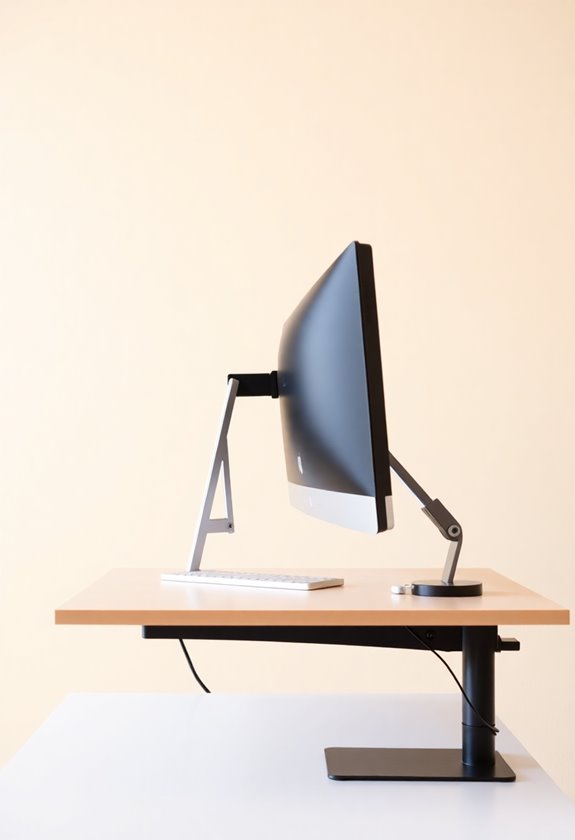
Proper screen positioning forms the foundation of a healthy digital workspace. You'll want to place your monitor directly in front of you, with the screen's top at or slightly below eye level for ideal neck alignment. Position your screen at least 20 inches away, or roughly an arm's length from your seated position. Following Dr. Hedge's guidelines will help optimize your monitor setup for maximum comfort.
For the best viewing experience, angle your monitor slightly and make certain its center sits about 17-18 degrees below your horizontal line of sight. If you're using dual monitors, position your primary screen directly ahead and angle secondary screens inward. A standing desk converter can help achieve optimal screen height while allowing you to alternate between sitting and standing positions throughout the day. Don't forget the importance of eliminating glare – keep your monitor away from windows and adjust room lighting accordingly. These small adjustments can greatly reduce eye strain and prevent neck discomfort during long work sessions.
Choose The Right Eyewear

When it comes to protecting your eyes during screen time, selecting the right eyewear can make a considerable difference in managing digital fatigue. Blue light glasses are becoming increasingly popular, and while research shows mixed results, they may help reduce eye strain and improve sleep quality. Many leading brands like CNET-certified experts recommend these glasses for prolonged screen use. Eye health experts suggest wearing blue light glasses can help minimize screen-related discomfort.
When choosing blue light glasses, focus on these key features:
- Look for lenses that block 40-85% of blue light wavelengths
- Verify the frames are lightweight and comfortable for extended wear
- Consider prescription options if you need vision correction
- Check for UV protection as an added benefit
Don't forget to verify the brand's reputation and read user reviews before making your purchase, as quality can vary considerably among manufacturers. You'll want glasses that deliver real protection rather than just fashionable frames.
Master The 20-20-20 Rule

Beyond protective eyewear, mastering the 20-20-20 rule offers a simple yet powerful way to combat digital eye strain. This proven technique requires you to take a 20-second break every 20 minutes and focus on something at least 20 feet away, which helps your eye muscles relax and maintain their flexibility. Standing mats at your desk can help reduce overall body fatigue while practicing these eye exercises.
To implement this effectively, you'll want to set regular reminders on your device or use a dedicated app to track your intervals. During these brief pauses, combine your distant focusing with gentle stretches and proper blinking to maximize the benefits. Consider using artificial tears regularly to prevent dry eye symptoms that often accompany extended screen time. You can enhance the rule's effectiveness by maintaining proper screen positioning, adjusting your monitor's brightness settings, and ensuring your workspace has adequate lighting to reduce glare.
Stay Hydrated Throughout The Day

Adequate hydration plays a crucial role in managing screen fatigue and maintaining eye health. You'll want to sip water steadily throughout your workday, and keep a reusable water bottle within arm's reach of your workspace.
Start your morning with a glass of water, and set regular reminders on your phone to maintain consistent hydration. While plain water is ideal, you can boost your fluid intake by incorporating hydrating foods into your diet, such as cucumbers, watermelon, and celery. During intense work sessions, consider using electrolyte-enhanced beverages to replenish lost minerals. If you're finding it challenging to drink enough water, try infusing it with fresh fruits for added flavor, or opt for clear broths and naturally hydrating foods like oatmeal and milk-based beverages.
Exercise Your Eyes Regularly

Regular eye exercises can greatly reduce screen fatigue, much like how proper hydration supports overall eye health. You can protect your vision by incorporating simple exercises throughout your workday, such as following the 20-20-20 rule where you look at something 20 feet away for 20 seconds every 20 minutes. When practicing eye exercises, remember to maintain consistent habits and combine different techniques for maximum benefit.
- Try the "figure 8" exercise by tracing an imaginary figure 8 with your eyes to improve flexibility and reduce muscle tension
- Practice "zooming" by focusing on your thumb as you move it from arm's length to about three inches from your face
- Use the "palming" technique during breaks by covering your closed eyes with warm palms for two minutes to relieve stress
Take Strategic Movement Breaks

Strategic movement breaks throughout your workday serve as more than just a chance to step away from your screen. They're essential for reducing eye strain, preventing muscle tension, and maintaining your mental sharpness throughout the day.
To maximize the benefits of movement breaks:
- Schedule 5-10 minute breaks every hour for stretching or walking
- Follow the 20-20-20 rule: look at something 20 feet away for 20 seconds every 20 minutes
- Step outside for fresh air when possible
- Use break reminder apps to stay consistent
You'll notice improved focus, creativity, and overall productivity when you incorporate regular movement into your routine. Whether it's gentle stretching, a brief walk, or some mindful breathing exercises, these strategic pauses will help you maintain both physical comfort and mental clarity. Using an adjustable footrest position during work hours can further enhance comfort and promote better posture during screen time.
Use Document Stands Effectively

Along with movement breaks, proper document placement plays a key role in managing screen fatigue. You'll want to position your document stand at the same height and distance as your monitor, ensuring it's aligned to minimize unnecessary eye movement throughout the day. For maximum effectiveness, adjust the stand's position to match your dominant eye and consider lowering both the monitor and document placement if you're using bifocals.
- Choose an adjustable stand that allows you to modify height, angle, and distance for your specific needs
- Place documents between your keyboard and screen to maintain proper posture and reduce neck strain
- Make document stand usage part of your daily routine, combining it with regular screen breaks
Maintain Proper Screen Distance

Positioning your screen at the right distance is essential for preventing eye strain and maintaining productivity. You'll want to keep most screens between 20 to 40 inches away, which is roughly arm's length for ideal viewing.
For specific monitor sizes, adjust accordingly:
- 24-inch monitors: Position 20-28 inches away
- 27-inch monitors: Keep 24-32 inches from your eyes
- Smartphones: Maintain at least 12 inches of distance
To minimize eye strain, tilt your screen 10-20 degrees back from vertical and follow the 20/20/20 rule: every 20 minutes, look at something 20 feet away for 20 seconds. Remember to place your screen directly in front of you, and if you’re using a laptop, consider adding a separate keyboard to maintain proper distance. When working on a computer, make sure the room is well-lit and adjust the screen brightness to a comfortable level. Additionally, consider using anti-glare filters to reduce the amount of light reflecting off the screen. These are gentle ways to reduce screen time and lessen the strain on your eyes.
Frequently Asked Questions
Can Screen Fatigue Contribute to Long-Term Vision Problems?
Picture your eyes as overworked muscles at a digital gym, constantly straining without proper rest – that's screen fatigue in action. You're risking serious long-term vision problems when you don't manage excessive screen time, as prolonged exposure can lead to persistent nearsightedness, chronic dry eyes, and permanent eye muscle strain. Your unmanaged screen habits today could result in significant vision impairments tomorrow, with studies showing that continuous digital exposure may accelerate age-related vision decline.
How Do Different Types of Screens Affect Eye Strain Differently?
Different screens impact your eyes in distinct ways. Computer monitors tend to cause more strain due to their direct eye-level position and larger size, while smartphones and e-readers are less strenuous because they encourage a natural downward gaze. You'll find that curved monitors and screens with built-in eye care features can reduce strain, and TVs typically cause less fatigue because you're viewing them from a greater distance.
Should I Adjust My Screen Habits When Working Night Shifts?
While you might think screen habits don't matter as much during night shifts, they're actually more critical then. You'll need to adjust your screen settings and viewing habits to protect both your sleep cycle and eye health. Try using blue light filters on your devices, dim your screen brightness to match your surroundings, and take regular breaks using the 20-20-20 rule to reduce eye strain and maintain your natural sleep-wake rhythm.
Does Screen Fatigue Impact Productivity and Decision-Making Abilities?
Screen fatigue considerably impacts your productivity and decision-making abilities through multiple channels. You'll notice up to a 20% decrease in work efficiency when experiencing Computer Vision Syndrome symptoms, while undetected vision problems can reduce your productivity by up to 21%. Additionally, the blue light from your screens disrupts sleep patterns and cognitive function, making it harder for you to concentrate and make well-reasoned decisions throughout your workday.
Are There Specific Eye Exercises Recommended for Contact Lens Wearers?
If you're a contact lens wearer, focus on gentle exercises that won't irritate your eyes. Start with frequent blinking to maintain lens moisture, and practice the 20-20-20 rule throughout your day. You can safely perform palming exercises while wearing contacts – just verify your hands are clean. When doing focus-shifting exercises, alternate between near and distant objects slowly to prevent strain, and always stop if you experience any discomfort.